Monday, March 6, 2017

The Decline of Physical Media


Background
The increased capability of modern bandwidth and availability of streaming services has already begun to kill physical media. The ease of access to movies (Netflix/Hulu) and music (Spotify, Apple Music, Soundcloud) greatly reduce the demand for for relatively expensive physical copies such as Blu Ray.
Image result for decline of physical media graph
(Source: PwC’s Entertainment and Media Outlook report, June 2015)

In basic practice approximately $10 a month unlocks a number of movies/songs that would cost a small fortune to physically purchase. For the average consumer (myself included) the benefits of this model are more than enough incentive to sign up. That being said, this paradigm shift of how we consume media has also changed the ownership dynamic for said media.

Who owns media?
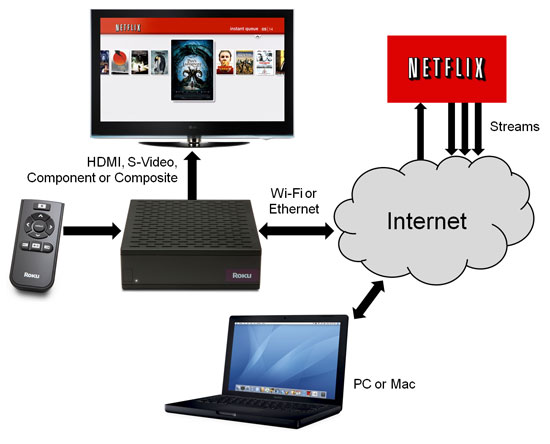
Image result for netflix streaming diagram

Streaming, by definition, is funneling a continuous stream of data from a server over networks onto a client device. At no point is the data actually downloaded or stored on a client device in any permanent fashion. This is why streaming services can offer such a wide variety of content for relatively low prices and so conveniently. It also means that as the end user, you only own the right to access the content, not the content itself.

The most obvious and common issue brought about by this is price hikes. The early days of Netflix streaming had a monthly subscription of $4.99, half of what it currently is today. Furthermore, in 2016 Netflix got rid of all grandfathered rates. Spotify has undergone its own price increases as it reached maturity and these instances are the most probable outcome of the streaming business model.

Amazon took criticism recently when they pulled a Christmas movie from their library right before Christmas season. Amazon movies are streamed on a per-purchase basis as opposed to Netflix's all-size-fits-one approach. Natural disasters, mergers/acquisitions or a new CEO could also change a consumer's access to "their" content.

Image result for ps4 download

The video game industry is the streaming hold out so far in terms of digital media for a few reasons; 1) the size, depth and interactivity of a video game greatly trumps even the longest movie let alone song, and 2) video games are notoriously hard to pirate or crack compared to other media (more on that later). Even so many of these issues mentioned above are appearing in the realm of video games as physical discs are being phased out.

The EULA’s that no one reads cover a wide range of these instances and issues and more often than not the end user has no recourse regarding changes to the deal. Owning a physical CD, or even a flash drive with .mp3 files on it, eliminates these problems for the consumer but acquiring it is time consuming and either costly or illegal...

Intellectual Property in the Digital Age
Image result for tpb logo

Intellectual property (IP), piracy and torrenting have been hot button issues in the tech world for some time now and are intertwined with the phenomenon of declining physical media. Pirating movies and music was a popular method of circumventing IP owners long before the rise of Spotify and Netflix. A little bit of know-how and guile allows most anyone to freely download songs, movies and even expensive software suites.

As previously mentioned, video games (console) have always been difficult to pirate. Console manufacturers are so heavily involved in the specs and development of games for their consoles that cracking games was always relatively difficult. It would almost always require plugins, emulators or even physical hacks to the console. PC games have historically not had this issue, though even the top pirates report that anti-copy protection has become to hard to crack. 

Your Choices
Given that most laptops being sold right now don’t have a CD drive and the phrase “Bluray player” is going the way of “VCR” you have two options for consuming media. There’s the high road:

And there’s the free road:

Most everyone under the age of 30 will take no issue with the convenience of streaming or saying good bye to DVD’s. I just find it interesting that the standard, legal and kosher mode of consuming media has had its ownership system so drastically changed. 

Sources/Further Reading

Sunday, March 5, 2017

Tech Briefing: Internet of Things (IoT)


Background
The Internet of Things is a term that relates to “The Internet of Things (IoT) refers to the ever-growing network of physical objects that feature an IP address for internet connectivity, and the communication that occurs between these objects and other Internet-enabled devices and systems” (Webopedia). Almost any object you can think of, from refrigerators, to lights, vending machine, even clothing, can now be connected to the internet and your other devices.

The Internet of Things first gained widespread popularity in 2008, when the number of devices connected to the internet surpassed the population of Earth. In 2011, IPv6 launched, allowing for 2^128 new IP addresses, ensuring that there will always be enough IP address for unique devices. Due to Moore’s law, chips are becoming smaller and cheaper, which makes it easier for the common person to purchase a small computer. This allows users to create their own projects and add to the IoT!

Projects
Internet of Things gives users the ability to create endless amounts of home projects and creations. When using a Raspberry Pi you can turn almost anything you want into a smart product. The most recent project I have been following involved an entire smart house. The house had smart keys, a smart voice alarm clock and a central smart hub with an interface. The smart keys have the ability to track keys and acknowledge when they have been returned to the key rack.Raspberry Pi 2
The smart voice alarm clock is very similar to the Alexa or the Google Home. Smart voice devices are very common IoT projects and can be accomplished with a raspberry pi and some coding experience. The alarm clock basically functions like Alexa but is more personalized to the user who creates it. The smart hub is very impressive. It gathers all the statistics and handles all the controls. The entire house is portrayed through the hub interface which communicates directly with both the alarm clock and the smart key rack. For instance, if a door on the other side of the house was open or unlocked, you smart hub would acknowledge that and notify you via the hub interface or through the smart voice. I’ve attached a link below that shows all the functions of this smart home creation.

SmartHome Video


I personally am working on a project myself. I am attempting to make an IoT doggy door with a Raspberry Pi. Basically the door will be rfid activated. So the dog will have to have an rfid chip on his collar. The door will also operate through time and weather. For instance, if it is raining the door will lock and the dogs won’t be able to run in and out and get mud everywhere. The door will open at 6 am and close at 9 pm.

Security Risks


The main issue that IoT faces today is the inherent security risk in most devices. Realistically, wifi enabled baby monitors and webcams are easily hacked into remotely, which could give someone easy viewership of your private life. Companies like Microsoft and IBM are taking steps to have better encryptions, but there’s only so much they can do when faced with so many third-party devices. The best way to stay safe, is to do a lot of research before buying a product, and check where all your information is being routed to consistently.
Future

IoT capabilities are growing everyday and I have noticed one company that is personally setting the bar for IoT, IBM. The IBM Watson IoT platform is changing everything from development, product, operations and much more. The Watson IoT platform can be applied to almost anything. Watson is a highly advanced AI that can basically do all. Watson helps engineers develop faster, monitor regularly and deploy faster. There is so much flowing data that nobody knows what to do with. Watson has the ability to use all that data and analytics to help innovate, develop trends and become more efficient. Watson is currently the strongest and most cognitive AI on the market.


References

https://www.reddit.com/r/homeautomation/comments/5xa0h1/ring_pro_doorbell_calling_china/
http://www.postscapes.com/internet-of-things-history/
http://www.webopedia.com/TERM/I/internet_of_things.html
https://techcrunch.com/2015/10/24/why-iot-security-is-so-critical/
http://discover-iot.eu-gb.mybluemix.net/#/play


Authors: Ben Ampel & Cole Bennett


Wednesday, March 1, 2017

Tech Briefing: Encryption for Personal Use

Brief History
Encryption has been around in one form or another since almost 2,000 BC. Around 100 BC was when Julius Caesar first used encryption so that the messages to his generals could not be read by outside eyes. He was credited for invented the Caesar Cipher wheel, pictured below. Using the wheel in this example, every “N” becomes an “A” in the message and so forth. Another message would inform the recipient which letters to line up on the cipher wheel to decode the encrypted message.


Since the invention of Information Technology, encryption has grown from ciphers to become a much more complicated, and important, part of our daily lives. There are many reasons you may want or need to keep your web traffic from prying eyes, such as entering confidential information and having private conversations.

VPNs
One of the most basic forms of encryption that you’re probably familiar with is the Virtual Private Network, or VPN.   There are a variety of different VPNs for different purposes, such as:
  • Corporate VPNs that encrypt an entire network’s traffic
  • VPNs to connect to corporate servers away from the office (ex. The UA VPN) 
  • VPN routers that automatically reroute and encrypt users’ network traffic
  • Web or application-based VPNs for personal use


Among the many VPN protocols, IPSec is considered the most secure. In fact, our friend Edward Snowden (or enemy and national traitor, depending on your point of view) has stated that the US Government has yet to crack IPSec, although they have in fact cracked other VPN encryption protocols. Below are a few free IPSec VPN options for personal use:

HTTPS: HTTP + TLS/SSL
HTTPS is a protocol for encrypted and secure communication for communication with websites over the internet. It means that the HTTP website is protected with Transport Layer Security or Secure Sockets Layer. In other words, the website is verified by a certificate authority to ensure that transmitted data is both encrypted for privacy purposes and not tampered with in transmission. The following is what an HTTPS protected website will have at the beginning of its address:


You should never enter credit card or any personal information on a website that does not have an address that begins like the one pictured above. Today, not only online stores are HTTPS protected, but most websites like Facebook, YouTube, and millions more are HTTPS protected. Note that HTTPS encrypts data between client and server, which provides privacy, prevents tampering with data, and guards against “Man-in-the-Middle” attacks from hackers pretending to be someone they are not, this form of encryption is NOT as secure as End-to-End Encryption.

End-to-End Encryption – Who Can We Trust?

End-to-End Encryption means only the communicating end users can view messages or content. Not even Internet Service Providers or companies*** providing the encryption or messaging service can view messages, or hand them over to authorities. If communications are server-based, it is very unlikely that messages sent by them are E2E Encrypted.

Here are some examples that have encryption technologies in place, but only WhatsApp has End-To-End Encryption (with some caveats):
  • WhatsApp: The company claims that it does not store messages on its servers, which means it can’t hand over messages if approached by law enforcement officials.
  • iMessage - Apple’s iMessages are end-to-end encrypted, which means they can only be read on users’ phones and the company can’t read them. But, you back up your messages in iCloud, then Apple can read them and could be forced to hand them over to authorities if provided with an appropriate warrant.
  • Telegram: Telegram messages can be totally private if you want them to be. The company offers end-to-end encryption if users turn on the app’s “secret chat” feature and thus can’t read those user messages. Regular messages are stored on Telegram’s servers. The app benefited immensely from Brazil’s temporary WhatsApp ban. Telegram claims that it added 5.7 million new userson the day WhatsApp was blocked.
  • Signal: Owned by Open Whisper Systems, Signal is also end-to-end encrypted. The company explicitly states on its website that it “does not have access to the contents of any messages sent by Signal users.”
  • Line: Line offers end-to-end encryption, but only if both the sender and recipient of a message turn on a feature called “Letter Sealing.” This will encrypt your messages so the company can’t read them, but regular messages without the feature are not end-to-end encrypted and Line may have to hand them over if required by Japanese law.
  • Cyber Dust: Cyber Dust messages are encrypted end-to-end and the company claims they never even touch company servers. They’re also deleted from user phones as soon as they’re read (a la Snapchat). That means the company cannot hand over messages to authorities, even if a formal warrant was provided. “Once it’s gone it’s [gone],” CEO Ryan Ozonian told Re/code.
These Companies Can Read Your Messages

  • Facebook (Messenger and Instagram):  Both Facebook Messenger and Facebook-owned Instagram encrypt messages only when they are en route between a user’s device and company servers where they are stored. This means Facebook might have to hand over private messages if required by law. 
  • Google:  Messages sent via Google Hangouts are also encrypted en route and even on the company’s servers, but Google can still read them if needed. Encrypting the messages while on Google servers is intended to keep others from jacking in and reading them, but Google itself has the encryption key. This means Google might have to hand over private messages if required by law. 
  • Snapchat:  Like Google, Snapchat messages are encrypted while at rest on Snapchat’s servers (though the company has the encryption key if needed). Snaps are deleted from the servers as soon as they’re opened by the intended recipients, and Snapchat claims  these delivered messages “typically cannot be retrieved from Snapchat’s servers by anyone, for any reason.” But unopened Snaps are kept on the servers for 30 days before being deleted. That means Snapchat might have to hand over unopened, private messages if required by law. 
  • Twitter:  Direct messages on Twitter are not end-to-end encrypted. The company might have to hand over private messages if required by law. 
  • Skype:   Microsoft-owned Skype does not offer end-to-end encryption for instant messages. They are stored on Skype’s servers for a “limited time,” which means Skype might have to hand over private messages if required by law.

While E2E is regarded as more secure than most forms of encryption, it is not without its challenges. Most E2E protocols include some form of authentication at the endpoint to keep messages secure from “Man in the Middle” attacks, in which a third party can intercept or alter messages. Using verification from certificate authorities similarly to how HTTPS is verified is one security option. Another is to use cryptographic hashes, which will be explained shortly.

*** Also, it should be noted that some services that claim to provide E2E Encryption may in fact allow messages to be viewed by the service provider. Thanks again to our friend Snowden, we know that Microsoft has handed the NSA Skype messages that were “officially” E2E Encrypted. Apple, on the other hand, won a landmark case last year for refusing to hand over a user, albeit a terrorist’s, E2E Encrypted messages to the US Government.

Hashes
Hashing was mentioned in the explanation of E2E Encryption, although its use is not limited to this function. Hashing is a special form of one-directional encryption that takes data of any length and converts it into a fixed-length data message or “digest”. Because a data string of any length must not produce the same hash value of any other data string, hashing algorithms are extremely complex and sophisticated. Unlike true encryption, hash functions are only one way: encrypted data cannot be transformed/decrypted back to its original state.

Hashing has specific uses in cryptography for:
  • Checksums to detect corrupted data
  • Digital fingerprints
  • Randomization functions
  • Password storage
  • Ciphers
Example Hash function: http://www.fileformat.info/tool/hash.htm

TOR

TOR, short for The Onion Router, is perhaps the best tool to provide true anonymity on the internet. TOR is a web browser that encrypts data at the application layer, then relays it through over 7,000 locations in a virtual circuit to completely hide users’ IP addresses and physical locations. A typical VPN might reroute web traffic a few times, but TOR does thousands of times to conceal users’ web traffic. That’s exactly why it’s called The Onion Router, each relay encrypts and decrypts only the previous’ data to essentially provide 7,000 “layers” of protection, like how an onion has layers.


You’ve probably heard of “the Darknet” or “the Deep Web” which is essentially a collection of websites including illegal goods marketplaces SilkRoad and Agora that can only be accessed via TOR. TOR is often confused with the Darknet itself, but really TOR is the primary tool used to access the Darknet. Trying to reach Darknet websites like these from any other browser, like Chrome and Safari, is impossible. Darknet websites such as these which connect buyers and sellers of illegal drugs, pornography, assault weapons, stolen identities, and much more are only accessible via TOR to ensure that all activity is hidden within TOR’s layers from the eyes of the outside world and law enforcement.

Monday, February 20, 2017

Tech Briefing: Communicating Data (Data-Driven Storytelling)


The amount of available data collected every two years roughly doubles, mimicking Moore's Law. Data on the magnitude of petabytes and zetabytes. As a result, big data, and data in general, has become a trend in business and everyday life. This is because data is an underutilized resource. Everyone has it, but few are capable of capitalizing on it. 

To fully realize the potential of data, it must tell a good story. Humans understand and process information best in narrative form, which is why storytelling has been around as long as humans have. When working with data, this can seem difficult as few people associate spreadsheets with a good story. Hopefully after this tech briefing that will change.

As part of my senior thesis I am integrating data-driven storytelling into college media by doing data journalism for the Daily Wildcat. This combines two of my passions and academic activities: working with data (MIS) and story (journalism). Traditional journalism focuses on human sources, while data journalism uses data as the primary source and humans as secondary sources. Below are links to some of the stories I've published this year:  

FOIA-ing for police reports to find where parties are taking place around campus by creating a red tags heat map

7 Data Visualizations that explain the Sean Miller Era of UA basketball

Analyzing 22,000 on campus parking citations find the best place to park illegally 

Fact checking the proponents and opponents of Prop 205 (Recreational Marijuana) by digging into the data

Pac-12 Undergrad Ethnicities Viz

To tell a story with data requires going through a process which mimics data science:


  1. Ask an interesting question
  2. Get the data
  3. Explore the data
  4. Communicate and visualize the findings

Communicating Your First Data-Driven Story:
  1. Find your subject
    1. Pick a topic that has the potential for a good story
    2. Ask an interesting question that people want to know the answer to
  2. Find your data
    1. Define your terms and find the associated
      1. E.g. How to get away with parking on campus → parking citations
      2. Partying at UA → Red tags
      3. Sean Miller is a good coach but what makes him elite → KenPom, team stats vs D1 average
    2. Living in the age of data means an abundance of publicly available data. FOIA-ing public institutions is also an option
  3. Clean your data
    1. Get your data in a format it can be analyzed to relate back to your story subject
      1. Normalizing the data
      2. Pareto Principle: 80% of the time will be preparing the data and 20% will be analyzing and visualizing it
    2. Find the answer to your question
  4. Present your data
    1. VISUALIZE
      1. Humans are visual creatures, and this helps transform raw data into intuitive information
  5. Check your story for the following:
    1. Audience
    2. Lede
    3. Nut graf
    4. Reference point
    5. New understanding from data

Following this process will ensure an effective communication of a data-driven story. If you're more interested in this and data journalism, here are some more infomation to check out:

Sites to Follow:
  • 538 - The standard of data journalism at the moment
  • /r/dataisbeautiful - Lots of interesting content from around the web aggregated here.The Upshot - The NYT data section
  • QZ - International site that does high quality work
  • Flowing Data - Aggregate of different data stories
  • The Economist - Usually has good visualizations that aid reader understanding
  • Polygraph - Really cin-depthepth data stories on pop culture

Stories/Visualizations:


Tools to Use:
  • Google Sheets or Excel
    • This is what I’ve used for more detailed mapping
  • R Programming
    • Useful statistical programming language. If you’re very interested in this stuff, R is worth your while
  • Python
    • Python is the second best option for everything
    • Pandas, NumPy, Matplotlib, ggplot, sci-kitlearn

Sunday, February 5, 2017

Team URLs and First Post

Please comment below with your team name, members, and your team's URLs from the group blogs you created last week, so I can post them on the blog roll for this class.

As you begin to redesign your blog, and search for a client, create a first post on your group blog that is a brief description of your client and some idea of the project you plan to investigate.  You can add more detail about the client and what you will investigate, but keep it to a paragraph for now.
________________

Please remember to add Dr. Suzie and TA, Rhythm Vij to your blog.   To do so, go to Design/Settings/Basic.  Then Add author.  In the blank, add spweisband@gmail.com and rhythm@email.arizona.edu (separated by commas).

Thursday, February 2, 2017

Team 10 - Wildcat Trio

Members

Jesus Gurrola
Ibrahim Alhariqi
Laura Pimienta


WIFI Corn

Alli Rakes
Matt Labarre 
Nicole Sale 
Gilberto Valdez